
监控工具之Nagios,搭建和使用( 四 )
check_command check_nt!UPTIME
}
#监控 windows 主机的内存使用状况
define service{
use generic-service
host_name ruanxi
service_description Memory Usage
check_command check_nt!MEMUSE!-w 80 -c 90 #内存使用到达80%则warn , 到达90%则Critical
}
check_nrpe
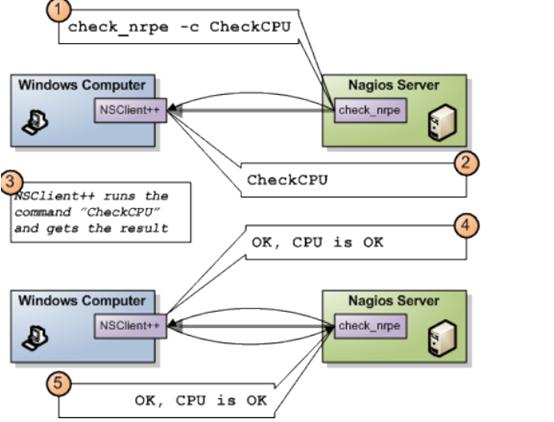
原理
 文章插图
文章插图
使用check_nrpe监控windows的原理与监控linux主机的原理一致 , 这样可以根据特定的需求自己写脚本 。以监控某个进程是否运行为例 编辑NSClient配置文件NSC.ini , 去掉以下几行前面的“;”号(去掉注释 , 使其生效)
NRPEListener.dll
script_dir=scripts\
CheckExternalScripts.dll
在NSClient安装目录下的scripts文件夹下 , 新建一个check_run.bat批处理文件 , 如下
@echo off
tasklist |find "%1" >NUL
IF ERRORLEVEL 1 GOTO err
IF ERRORLEVEL 0 GOTO ok
:err
echo CRITICAL: Process does not exist
exit /B 1
:ok
echo OK: The process of normal
exit /B 0
说明:脚本的退出值与nagios的报警提示对应关系为:0--正常 , 1--警告 , 2--严重警告 在NSC.ini文件中[External Scripts]下面添加如下行:
check_run=scripts\check_run.bat chrome.exe
重启NSClinet 可以在被监控端check_nrpe所在的目录(CentOs默认的安装目录为:/usr/lib64/nagios/plugins/)
./check_nrpe -H hostip -c check_run
注:-H后写刚才脚本所在的机器 , -c后写命令 , 这里对应配置文件中的check_run
如果结果与预期的一致 , 那么就可以继续配置监控端了
配置监控端 修改commands.cfg , 增加命令
define command{
command_name check_run
command_line /usr/lib64/nagios/plugins/check_nrpe -H yourip -c check_run
}
修改windows.cfg , 增加服务
define service{
use generic-service-urgent,srv-pnp
host_name youip ;要展示信息的机器的ip
service_description check_fileexistspan
check_command check_run
}
4. 报警4.1 报警配置文件
修改联系人
配置文件是contacts.cfg. 联系人定义方式为:
define contact{
contact_name nagiosadmin ; 用户名称
use generic-contact ;
alias Nagios Admin ; 用户别称
email ****@**** ;修改为需要通知的邮箱
}
该contact继承了templates.cfg中的genetic-contact , 如下
define contact{
name generic-contact ; The name of this contact template
service_notification_period 24x7 ; service notifications can be sent anytime
host_notification_period 24x7 ; host notifications can be sent anytime
service_notification_options w,u,c,r,f,s ; send notifications for all service states, flapping events, and scheduled downtime events
host_notification_options d,u,r,f,s ; send notifications for all host states, flapping events, and scheduled downtime events
service_notification_commands notify-service-by-email ; send service notifications via email
host_notification_commands notify-host-by-email ; send host notifications via email
register 0 ; DONT REGISTER THIS DEFINITION - ITS NOT A REAL CONTACT, JUST A TEMPLATE!
}
host_notification_commands指定的方式为notify-host-by-email , 如果是微信或短信等其他方式 , 用逗号隔开写在后面即可 。 其中命令notify-host-by-email的定义在commands.cfg中默认已定义 , 如下
推荐阅读







- 初探 iOS 自动化工具——快捷指令
- 微软官方数据恢复工具即将更新:更易于上手 优化恢复性能
- 免费好用:这款Win10系统增强工具不要错过(二)
- Flipper Zero将于下月发货:为极客打造的开源多功能小工具
- 比亚迪关联公司公开这项专利 能够解决交通工具能量补充问题
- 3D大屏监控选矿工艺
- 微软推实用磁盘工具DiskSpace 帮用户分析文件占用空间
- 元旦休假突发紧急办公 这款小工具足不出户让「远程办公」So easy
- 英特尔推出可检测代码错误的ControlFlag机器编程工具
- 危言耸听!美媒又抹黑“中国利用华为摄像头监控非盟”,网友直接怼:假新闻!可信度为零